Showing posts with label images. Show all posts

Thursday, 19 January 2012

Instructions for the game

I wrote the instructions and ran them by Becky, she liked the idea but suggested they were a little 'wordy' for kids, so I have simplified them.

To ensure I had covered all bases, to try and explain what the game was about, I made a list of the key components and purpose of the game, as well as the parts that link the game together.  I then made sure these particulars were put into the introduction.

The introduction and instructions will appear over the island, I layered Becky's image of the island in Illustrator, with a vignette and added a fine stroke and shadow to the text to make it pop out.


Monday, 16 January 2012

Buttons for navigation screen

Here are the buttons for the navigation screen.


Collating resources for Tuesday's build

We start the build on Tuesday before the tutorial session so Becky and I are collating our resources.

I completed the beach and updated the winning screen with the colours from the chosen scheme 'school fete' as well as adding a drop shadow (my favourite!)  I have not used the correct font for the winning screen as I don't know yet what the outcome was from the research, our shortlist font examples were put to the public to choose their favourites.  This can be changed quite easily in the psd. file.

I have not made any changes to the Countryside Game as this was completed last year.


Monday, 24 October 2011

The build schedule - planning

Here are the functions as an overview as outlined in the pitch document.

We need to have all elements ready to start building this tomorrow so we have something to show at the Working Presentation.

The finer elements and individual games can be built after we have delivered the presentation, should we not have time to do beforehand.  This will at least give the tutors/panel an idea of what the product looks like and how it operates.

In terms of the elements that we need to start building, these are the designs that we have been working on for the past few weeks.  So we need .JPEG or .PNG files of all the areas that the game will land.  These images will be as place markers/ holders, to indicate what happens at each location.

The above plan is very loose and still includes the post production and gallery areas that we are ditching for this version.

So the images required are as follows:
  • Black & Pink Logo
  • Game Logo
  • Island Map
  • School
  • Character/s
  • 3D image of camera
  • Countryside
  • Beach
  • Under the sea
  • Mountains
  • Points/ Prize display


Sunday, 23 October 2011

Some more versions of the points display.. found vignette tool too!

After months of faffing with ways to create vignettes I stumbled across the vignette gradient tool.  How have I never seen this before.  Thanks Gareth for pointing me in the right direction!

Here are a few versions of other points displays.

Obviously the font hasn't been chosen yet, and I may use different colour and more info, but it gives a sample idea.


Seabed design finalised - avec coral

Here is the final design for the under the sea game - was simply the addition of the coral.

To build the actual game itself I just need some of the fishes from Becky's picture, I'll get them on Tuesday.


Saturday, 22 October 2011

Colour scheme agreed

School Fete! This is our chosen colour scheme.


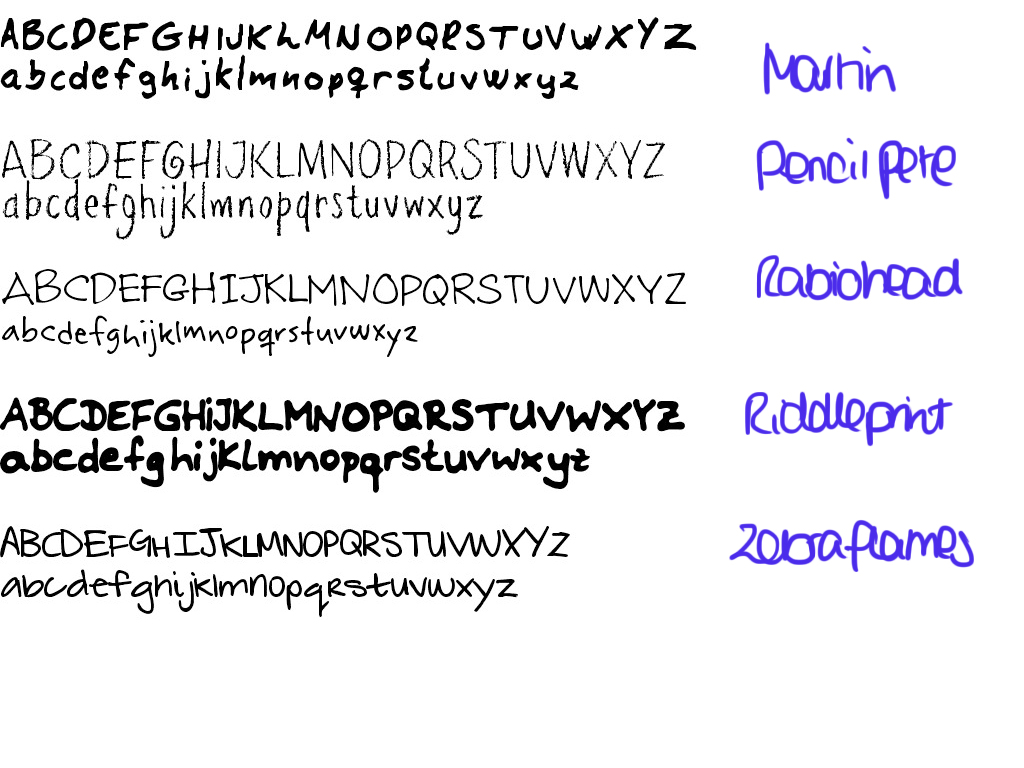
Clare's Font Shortlist

I created a sentence for each of my shortlisted fonts.  This was to see how legible they were, particularly for a younger reader as our gamers will be 6-11 years old.

I don't want to use Childs Play because I have used it before, in fact it is my brand font for Clare Waterfall Photography, but it does work well!

Tomorrow I will look at these with fresh eyes and critique each.  Becky may have a favourite that jumps off the page, she may hate them all.  Shall see Tuesday.

Font shortlist

Fonts for our game

Becky suggested that the font we use is a handwritten one and asked that we see what is out there and pick our favourites.

Here are some that I found appealing, I will shortlist perhaps my top 5, download the fonts and trial them to pick my faves.


Countryside game - designs complete, ready to build into game!!!

Following a return look at the designs and consultation with Beck, I have ditched the details and brightened up the colours.

I used the gaussian blur tool on several of the layers to create various depth of field effects.  These were .ai files were exported to Photoshop to create a .psd with each version on a different layer.  Tis will be imported into Flash to flick between layers to simulate the aperture being changed.

I suspect I could have done the same with a new.ai file with each image on a seperate layer.  I have also exported the individual frames as .jpgs in the event that this should be a simpler way of moving between images.

Here are the designs in the .jpg format, in the new 1024 x 768 aspect ratio for the game build.  The viewfinder will sit on top of the designs.  I'll need to change the aspect ratio of the viewfinder also!

Small aperture

Mid aperture

Large aperture

Sunday, 16 October 2011

Points display - work in progress

So this can also be the inventory screen.

Work in progress, more designs to come.  Also want to work on a vignette to drop over the last viewed screen (see beach as example).


Countryside game design

Here are two versions.  One I have used some Illustrator symbols for details.

Think I need to go away and come back with fresh eyes to see which I prefer.

It feels like cheating using the symbols, my artist's pride is telling me that I should draw these elements by hand... maybe for the purpose of the working presentation I can use the version with the symbols, then when I have time, draw the details myself.

Either way, whichever version we opt for, I will be producing 3 versions.  Each version will have varying levels blurred/ out of focus, to demonstrate the effect that aperture has on depth of field.

With 'cheating' symbols

simple versions

Saturday, 15 October 2011

More contextual research - Game Company Logos

Here are the game company logos that I found.

Games Company Logos

Contextual research - display screens and logos

As part of my ongoing contextual research, I have been obtaining images of game points displays, intro screens/ menus, game over, game logos & games company logos.


Oh the exciting things we do when the other half is working for the night!


These should help get an idea of what is commonplace in the industry's market, if they all have a common theme, that suggests it is a method that works.  This should help us steer our design development along the right path.  It is all well and good being different to show our creative abilities, but if it is not in keeping with a market's tastes, we may alienate a proportion of potential sales.


Here are the points display screens.


Here are the games logos.


Friday, 14 October 2011

Colour schemes continued...

Here are the swatches for the colour schemes with the themes 'photograph' and 'school'.

The 'island' themes are on a previous colour scheme blog article.

Becky and I are going to give consideration to our favourites over the weekend and agree on the brand colours on Tuesday.

Photograph inspired colour schemes

School inspired colour schemes

School Shop so far....

Not sure if we are using this as we are probably going to award a set piece of equipment upon completion of a game.  However this will be introduced in version 2.  The design still needs some edits.  I will export to Photoshop to add more shadow and texture.

I'm going to wait until the brand's colour scheme is agreed first to ensure uniformity, at the very least to be sure the designs do not clash with the interface that Becky is designing.

Even if we do not use the shop, it is still worthwhile designing.  We may use the kit designs as icons for the awarded items upon completion of games.

Had another idea that perhaps there would be a kit bag to show what the player had earned and is able to use, so the kit designs can again be used there!


Thursday, 13 October 2011

3D models complete!

Here is the camera, flash gun, lens, memory card, battery and waterproof housing unit... phew!

Tomorrow's tasks are to create the shop and the colour scheme swatches.  I can design the layout of the points display but the colours may depend on the branding which will not be agreed until Tuesday's meeting.


3D Lens built

I have built the lens for the 3D equipment tutorial, using the usual Google Sketch Up.  The tricky part was the convex lenses, but I worked it out through trial and error using the arc and follow me tool!  There is also the addition of lens mount on the camera.